How to plan social media posts: from the calendar to a publishing routine
From the calendar to the routine: five scenes to plan, create, schedule, publish and review the week's posts, with times taken from your own profile's data.
 Nekohito Troupe
Published on 13 November 2026
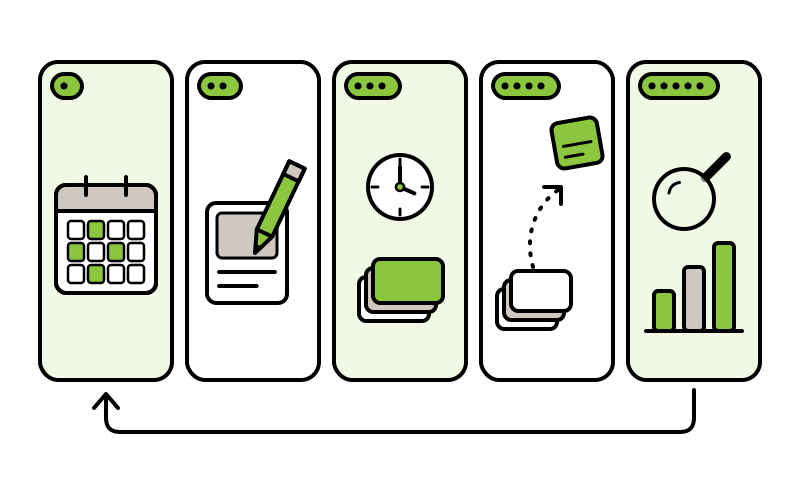
To plan the posts on your social media, start by deciding what your profiles are for and on which platforms the audience you want to reach can be found. Then put a week of posts into a simple table, with the day, the platform, the format, the theme and the status of each post. Finally, schedule each post in the platform’s own tool, at the times your profile’s activity report shows, and at the end of the week check the numbers to decide what changes the following week.
On Nekohito, this routine is told in five scenes. Each scene produces something concrete, and the next scene starts from it:
- Plan. A table with the week’s posts: day, platform, format, theme and what each post will say.
- Create. The week’s texts and images, made in a single session and reread before moving on.
- Schedule. A queue of posts with a date and a time, set up in each platform’s scheduling tool.
- Publish. The posts go out at the set times, and you set aside a few minutes a day to reply to the people who comment.
- Review. One decision for the following week: keep, change or drop one thing.
The example that runs through the scenes is a ceramics studio invented for this guide: a small project, with one or two people who look after the profiles among other tasks. The studio’s numbers are illustrations; the numbers from the platforms and the studies always come with their source and date.
Before the first scene: what the profiles are for and where the audience is
The first scene happens before any calendar. The Content Marketing Institute, in a guide to editorial calendars dated 6 January 2022, proposes this order: count who contributes and how much time each person has, choose one main goal for the quarter and only then decide the mix of content that fits into that time.
For the example studio, the quarter’s goal could be to show how each piece is made and to let people know when a new kiln batch is ready. The time available, also an example, is three hours a week. With a goal and a number of hours written down, the question "which networks should I be on?" becomes simpler: the ones that serve the goal and fit into those hours.
The other half of the answer lies with the audience. People do not use just one platform, as the GWI survey published in DataReportal’s global report shows:
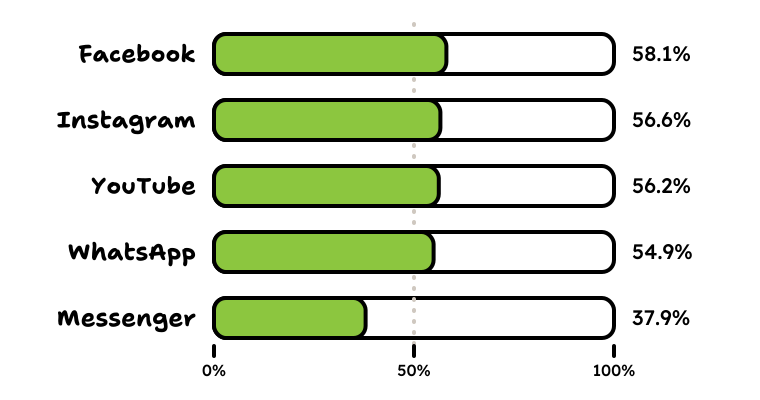
The mix of platforms also changes from country to country. The reports for each market, from the same series, show very different situations across the Portuguese-speaking countries:
| Market | Social media user identities, as a % of the population | Facebook reach reported by Meta’s advertising tools | Instagram reach, same source |
|---|---|---|---|
| Brazil | 72.0% | 106 million | 144 million |
| Portugal | 77.6% | 6.35 million | 6.10 million |
| Angola | 13.5% | 5.45 million | 1.10 million |
| Mozambique | 11.9% | 4.35 million | 687,000 |
Source: DataReportal, Digital 2027 reports for Brazil, Portugal, Angola and Mozambique, published on 5 November 2026 and accessed on 13 November 2026. The identities are from October 2026, and the reach is what Meta’s advertising tools reported when the reports were prepared. The reports point out that identities do not necessarily correspond to unique individuals and that the reach reported by advertising tools is not the same as the number of people active each month.
In Brazil, Instagram comes out ahead of Facebook; in Portugal, the two are close; in Angola and Mozambique, Facebook has several times Instagram’s reach. A general list of platforms, then, does not decide for you. What decides is where your project’s audience is, and each profile’s audience reports show where the followers come from. Stay with the platforms where that audience is and where you can keep up a rhythm; the others can wait for a quarter with more hours.
Scene 1, plan: recurring themes and the week’s calendar
With the goal and the platforms chosen, the first panel is the one for recurring themes: a few subjects that come back every week and serve the goal. Recurring themes spare you the question "what do I post today?", because every day already has a starting point. The example studio has four: "how it’s made", "piece of the week", "behind the scenes at the studio" and "news".
Next, the themes go into the calendar. HubSpot, on a page updated on 3 December 2025, defines a social media calendar as a planning document that organises posts by platform, campaign, date and other fields. In practice, it is a table: it can be made on a computer or on a sheet of paper, because what counts are the columns.
| Day and time | Platform | Format | Theme | What the post says | Status |
|---|---|---|---|---|---|
| Monday, 9:00 | Carousel | How it’s made | The stages of a bowl, from clay to kiln | Scheduled | |
| Wednesday, 18:00 | Photo | Piece of the week | A mug and the use it was designed for | Ready | |
| Thursday, 12:00 | YouTube | Short vertical video | Behind the scenes at the studio | Loading the kiln before a firing | Draft |
| Friday, 17:00 | Story | News | The day the next kiln batch will be ready | Idea | |
| Saturday, 10:00 | Pin | Piece of the week | The same mug, in a vertical image | Idea |
In your own calendar, the times come from your profile’s activity report, as the fourth scene shows.
The columns that help most, based on the parts of the calendar that HubSpot describes and the dates for each stage that the Content Marketing Institute proposes:
- Date and time
- The day and time of publication, in the audience’s time zone.
- Platform
- Where the post goes out. A post that goes to two networks takes up two rows.
- Format
- Photo, carousel, short video, story, Pin or text only. The format says what the create scene has to produce.
- Theme
- One of the recurring themes. With this column, a week in which every day has the same theme shows up at once.
- Text
- What the post says, in a draft sentence that the next scene completes.
- Link
- The address the post points to, when it points anywhere.
- Image
- What the image or video shows, and where it is stored.
- Status
- Idea, draft, ready, scheduled or published. This is the column that shows which scene each post is in.
- Who does it
- The person who prepares the post, when there is more than one.
Fixed dates go in first. They are the project’s own: a launch, the opening of a shop, a new collection. The Content Marketing Institute suggests starting from the date the content has to go out and working backwards, putting the date of each stage in the calendar. For a new collection at the studio, for example, the calendar gets the day the collection is presented and, one and two weeks before it, the days when the photos and texts have to be ready.
Scene 2, create: one batch of posts a week
In the second scene, the week’s posts are made in one go, in a session booked in the calendar itself. Working in batches avoids writing a post on the same day it goes out. The session always follows the same order:
- Texts. Write all of the week’s texts, one per row of the table.
- Images and videos. Prepare each piece in the format of the platform where it will go out.
- Second reading. Reread everything later, with the table beside you.
- Status. Mark each finished row as "ready".
Each platform accepts different formats, and the help pages say which. In Meta Business Suite, Meta’s tool for Facebook Pages and Instagram accounts, an Instagram post takes up to 10 photos, and a story up to 10 photos or videos. On YouTube, Shorts are vertical videos of up to 3 minutes. Both pages were accessed on 13 November 2026. When a post goes to two platforms, prepare both versions in the same session: the same subject, in each one’s format and size.
Two aids make the session shorter. The first is an idea backlog: a list where everything that comes up during the week goes, waiting for the weeks ahead. The second is reusable text, which HubSpot also suggests preparing: a sentence that introduces the project, a closing line with the site’s address. With both to hand, the session starts by choosing, not by inventing.
Scene 3, schedule: what each platform allows
In the third scene, the ready posts move from the table to the queue. Each platform has its own scheduling tool, and they differ on three points: who can schedule, how far ahead and what is left out. The table is not there to be memorised: each row leads to the page where the platform explains the details.
| Where | Who can schedule | How far ahead | What the page adds |
|---|---|---|---|
| Facebook and Instagram, in Meta Business Suite | Anyone with full access to the Page or the Instagram account, or with content permission | The page gives no limit: you choose the date and time | Posts, stories and reels are each scheduled with their own option; the text can be different for Facebook and for Instagram |
| LinkedIn, posts from your profile | Anyone posting from their own profile | From 10 minutes to 3 months | Some types of post cannot be scheduled, such as events; the time is converted to UTC from the device’s time zone |
| LinkedIn, a Page | A super admin or a content admin of the Page | From 1 hour to 3 months | Events, posts with several photos and reposts are among the types that cannot be scheduled |
| YouTube, in YouTube Studio | Whoever uploads the video to the channel | The page gives no limit | You set the date, the time and the time zone; the video stays private until then; the date on the video’s page follows Pacific time and may differ from the one YouTube Studio shows |
| TikTok, on the web | Creators and business accounts | From 15 minutes to 10 days, according to TikTok’s business blog (a page with no visible date); check the dates in the tool itself when you schedule | Once scheduled, the video, the text and the time cannot be edited: the post is deleted and uploaded again |
| Business accounts | Up to 30 days | Standard Pins, one at a time, with up to 10 scheduled at once |
Sources: the pages linked in each row, accessed on 13 November 2026. The platforms change these limits without notice; when what you see is different, the platform’s page is what counts.
The gesture is similar on all of them: you open the ready post, choose to schedule instead of publishing, set the date and time and confirm. In Meta Business Suite, for example, the date and time are in the scheduling options, and the same tool suggests times based on followers’ activity on Facebook and Instagram over the last 7 days. Afterwards, Planner, the calendar view, shows by week or by month what has already gone out and what is scheduled, and lets you change a post’s date or delete it.
There are also tools from other companies that bring several networks together in one calendar. They do the same scheduling work, and none of them is needed to follow this routine. Paid ads are a separate decision, with tools of their own; this guide covers only the posts you publish on your own profiles.
Scene 4, publish: when and how often
The posts go out, and the question of this scene is the one heard most often: what is the best time? The short answer is that no single time suits every profile. Three companies that make scheduling tools studied their own customers’ posts and came up with three different answers:
| Study | Published on | Whose posts | Sample and period | What it found |
|---|---|---|---|---|
| Sprout Social | 31 March 2026 | More than 30,000 of the company’s customers | Almost 2 billion interactions across about 307,000 profiles, from 27 November 2025 to 27 February 2026 | Tuesdays and Wednesdays, from 11:00 to 18:00, across the networks as a whole |
| Buffer | 25 March 2026 | Posts published with the company’s tool | More than 52 million posts; the page does not give the period | No single time; Facebook and Instagram: Thursday, 9:00; LinkedIn: Wednesday, 16:00; TikTok: Sunday, 9:00 |
| Hootsuite, with the agency Critical Truth | 19 November 2025 | The page does not describe the accounts | More than 1 million posts; the page does not give the period | Overall: Wednesday, 8:00; Facebook: Tuesday, 9:00; Instagram: Monday, from 15:00 to 21:00; LinkedIn: Tuesday and Wednesday, from 4:00 to 6:00; TikTok: Thursday, from 7:00 to 11:00 |
Sources: Sprout Social, Buffer and Hootsuite, on the pages listed at the end of this guide, accessed on 13 November 2026. Each study describes the accounts it analysed, not your audience.
The authors themselves say that the results are not a rule. Sprout Social writes that each brand’s best times depend on its audience, its sector and its time zone, and that they are worth testing on your own account. Buffer writes that there is no single best time that works for every network. Hootsuite writes that following your own account’s analytics is the most reliable way to know when your audience is online.
That report sits in a different place on each platform. In Meta Business Suite, suggested times appear when you schedule, and the audience section of Insights shows when followers are most active. In YouTube Studio, the "When your viewers are on YouTube" report shows when the channel’s viewers were on YouTube over the last 28 days.
From that starting point, change one thing at a time and keep the change for a few weeks before comparing: the time of one theme, the day of another. If your audience is spread across several time zones (Brazil, Portugal, Angola and Mozambique do not share the same time), the activity report already shows the hours when followers are online. YouTube asks for the time zone when you schedule, and LinkedIn converts the time from your device’s time zone: check the time zone before scheduling.
The same logic applies to frequency. On 5 March 2026, Buffer published a report on 4.8 million publishing weeks from about 161,000 profiles on Facebook, Instagram and X, all with posts made in its tool. The report describes what it found as patterns, not rules, gives no right number of posts per week, notes that each post’s reach tends to fall at the highest frequencies and recommends a pace that can be kept up without losing quality. In practice: choose the number of posts that the hours from the first scene allow, keep it for a month and review it in the fifth scene.
Scene 5, review: what to look at at the end of the week and of the month
The fifth scene closes the cycle. At the end of the week, open each platform’s analytics and look at a few numbers, compared with the same profile’s previous weeks, not with other profiles. What comes out of the review is a decision: keep, change or drop one thing.
Each platform gives its numbers names of its own. These are the most common, as the help pages define them (accessed on 13 November 2026):
- Views (Meta)
- The number of times your content was played or displayed. The Insights overview in Meta Business Suite shows the last 28 days.
- Content interactions and link clicks (Meta)
- They appear in the results, next to views, and the content table shows each post separately.
- Impressions, saves and outbound clicks (Pinterest)
- They are part of a business account’s analytics. The overview starts with the last 30 days, and a range you choose can go back as far as a year and a half. A video view counts when the video stays on screen for at least 2 seconds with half of the image in view.
- Content, followers and visitors (LinkedIn)
- Three of the kinds of analytics a Page has, available to every admin role. Content analytics show the results of each post.
A weekly review can fit into three lines. In the studio example: the "how it’s made" carousels had more interactions than in the previous three weeks; the behind-the-scenes videos, fewer. Decision: keep the carousels on Monday and move the videos to another day for a month. The decision goes into the following week’s table, and the cycle starts again.
Once a month, do a longer reading, with the quarter’s goal beside you. The Content Marketing Institute proposes measuring content against that goal and organising the calendar in cycles of one quarter. At the end of each quarter, the recurring themes are reviewed: the ones that no longer serve the goal go, and a new one comes in.
The whole routine in one week
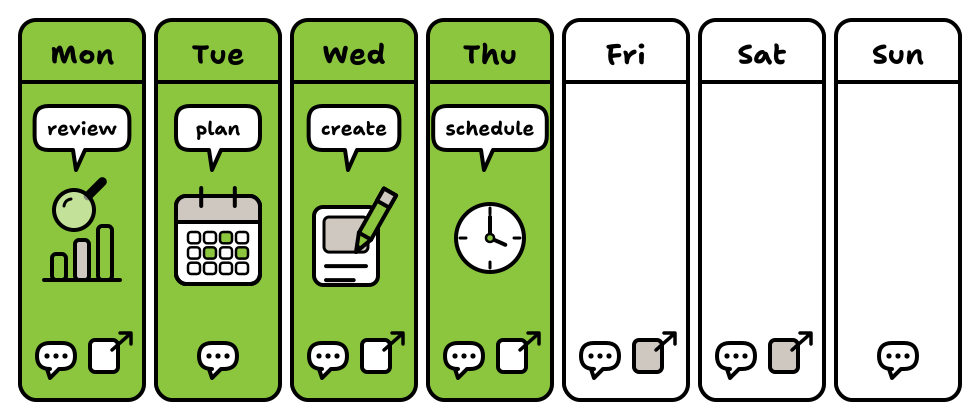
Set side by side, the five scenes fit into one week. In the studio example, Monday starts with a short review of the previous week; Tuesday is the day for planning; Wednesday, the day for the batch of posts; Thursday, the day for scheduling the following week’s posts. Every day, a few minutes are kept for replying to comments and messages. The three hours a week from the first scene are split across these four days.
Themes are reviewed by the quarter and posts organised by the week for a practical reason: the scheduling tools in the third scene range from a few days to a few months ahead, and a week of posts fits into every one of those that gives a limit.
And when a week falls through? The Content Marketing Institute recommends leaving some slack in the calendar. If a week goes by without posts, pick up again on the next scheduled day, without trying to publish everything at once, and move whatever was left undone to the following week.
The calendar does not choose for you: it keeps what you decided, so that each week starts where the last one left off.
Frequently asked questions
What is the best time to post?
There is no time that suits every profile. Three studies by companies that make scheduling tools, published between November 2025 and March 2026, gave different answers, and all three recommend testing on your own account. Start with your profile’s activity report and change one time at a time.
How many times a week should I post?
None of the sources in this guide gives a number that suits everyone. Buffer’s report of 5 March 2026 recommends a pace that can be kept up without losing quality. Choose the number your hours allow and review it after a month.
Do I need to be on every network?
No. Start with the quarter’s goal and the hours you have, and stay on the platforms where your audience is. DataReportal’s November 2026 reports show that the mix of platforms changes a great deal from one country to another.
Can I schedule everything months in advance?
It depends on the platform. On the pages accessed on 13 November 2026, the limits ranged from 10 days (TikTok, according to its business blog) to 3 months (LinkedIn), and some pages give no limit. That is why this guide organises themes by the quarter and posts by the week.
Can I publish the same post on several networks?
The same subject, yes, adapted to each one. Meta Business Suite takes a post to Facebook and Instagram in one go and allows a different text for each. On the other platforms, the formats and limits change, and the post is prepared again in each network’s format.
What if a week goes by without posts?
Pick up again on the next day marked in the calendar, without trying to publish everything at once. The slack that the Content Marketing Institute recommends leaving in the calendar is there for those weeks.
Sources
All pages were accessed on 13 November 2026. How we choose and check sources is set out in the editorial policy.
- Meta, Business Help Center: How to create and manage posts in Meta Business Suite on desktop, undated, accessed on 13 November 2026.
- Meta, Business Help Center: Create and manage stories in Meta Business Suite on desktop, undated, accessed on 13 November 2026.
- Meta, Business Help Center: How to create and manage reels in Meta Business Suite, undated, accessed on 13 November 2026.
- Meta, Business Help Center: Use Planner in Meta Business Suite on desktop, undated, accessed on 13 November 2026.
- Meta, Business Help Center: About Insights in Meta Business Suite on desktop, undated, accessed on 13 November 2026.
- LinkedIn, Help: Schedule posts, updated about a month before it was accessed, according to the page itself, accessed on 13 November 2026.
- LinkedIn, Help: Schedule a LinkedIn Page post, updated about a year before it was accessed, according to the page itself, accessed on 13 November 2026.
- LinkedIn, Help: LinkedIn Page analytics, updated about a week before it was accessed, according to the page itself, accessed on 13 November 2026.
- YouTube, Help: Schedule video publish time, undated, accessed on 13 November 2026.
- YouTube, Help: Understand your YouTube audience, undated, accessed on 13 November 2026.
- YouTube, Help: Get started creating YouTube Shorts, undated, accessed on 13 November 2026.
- TikTok for Business, blog: Introducing Video Scheduler: Now you can plan TikTok videos in advance!, no visible date, accessed on 13 November 2026.
- Pinterest, Business help: Schedule Pins, undated, accessed on 13 November 2026.
- Pinterest, Business help: Review Pinterest Analytics, undated, accessed on 13 November 2026.
- DataReportal (Simon Kemp, with We Are Social and Meltwater): Digital 2027 Global Overview Report, 21 October 2026, accessed on 13 November 2026.
- DataReportal (Simon Kemp): Digital 2027: Brazil, Digital 2027: Portugal, Digital 2027: Angola and Digital 2027: Mozambique, 5 November 2026, accessed on 13 November 2026.
- Sprout Social: Best Times to Post on Social Media 2026, 31 March 2026, accessed on 13 November 2026.
- Buffer (Kirsti Lang): The Best Time to Post on Social Media in 2026: Times for Every Major Platform, 25 March 2026, accessed on 13 November 2026.
- Buffer (Tamilore Oladipo): The State of Social Media Engagement in 2026: 52M+ Posts Analyzed, 5 March 2026, accessed on 13 November 2026.
- Hootsuite (Hannah Macready): Best time to post on social media in 2025 (by platform), 19 November 2025, accessed on 13 November 2026.
- Content Marketing Institute (Kelsey Raymond): 7 Steps to a More Strategic Editorial Calendar, 6 January 2022, accessed on 13 November 2026.
- HubSpot (Basha Coleman): Social Media Calendar Template: The 10 Best for Marketers, updated on 3 December 2025, accessed on 13 November 2026.
Nekohito Troupe
Editorial team
The Nekohito Troupe is the team that writes this website. We tell each digital marketing subject as a sequence of scenes, working from the sources cited in each guide, and we revise the text when a platform changes what it documents or when a reader points out a mistake.